Contact Us

Have an inquiry? Please send us a message.


123 Street Avenue, City Town, 99999

(123) 555-6789

email@address.com


You can set your address, phone number, email and site description in the settings tab.
Link to read me page with more information.

News

News from Elf, a digital creative agency at the intersection of the arts and sciences.

Apple's WWDC

Elf

Apple's WWDC18 is on today! Are you watching? We are! It’s starting in a little under 2 hours :) 

Image via Apple

Image via Apple

Image via Engadget (2017 WWDC)

Image via Engadget (2017 WWDC)

How to watch #WWDC18? @Apple’s live stream is available on the company’s own website https://www.apple.com/apple-events/june-2018/ … You need #Safari or Microsoft Edge on the desktop. You can also view through the Apple Events app on the @AppleTV at https://itunes.apple.com/us/app/apple-events/id1090599922?mt=8

Image via Apple

Image via Apple

Apple's HomePod gets AirPlay 2, Multi-room Audio and Stereo Pairing via iOS 11.4

Elf

Apple's Much Anticipated Update to iOS 11 Addresses Prior Shortcoming for Multi-Room Support for a More Immersive and Complete Audio Experience Throughout Your Home

When Apple's smart speaker HomePod first came out, we were excited to test out its acoustic performance and  integration with existing Apple systems. HomePod has an impressive subwoofer for a clean bass sound and provides directional control to more accurately convey the original richness of sound in any audio recording. This is a massive improvement to the smart speaker space with high fidelity sound and a larger sound stage.

Image via Apple

Image via Apple

Play and Control Music in Any Room

By adding AirPlay 2 software to the HomePod via iOS 11.4, HomePod can now play sound in multiple rooms throughout your home. You can control music playing in any room, on HomePod, Apple TV or any iOS device. You can also increase your sound stage by adding a second HomePod for a richer acoustic experience to fill any room with sound and more accurately reproduce lower frequencies such as deeper bass extensions.

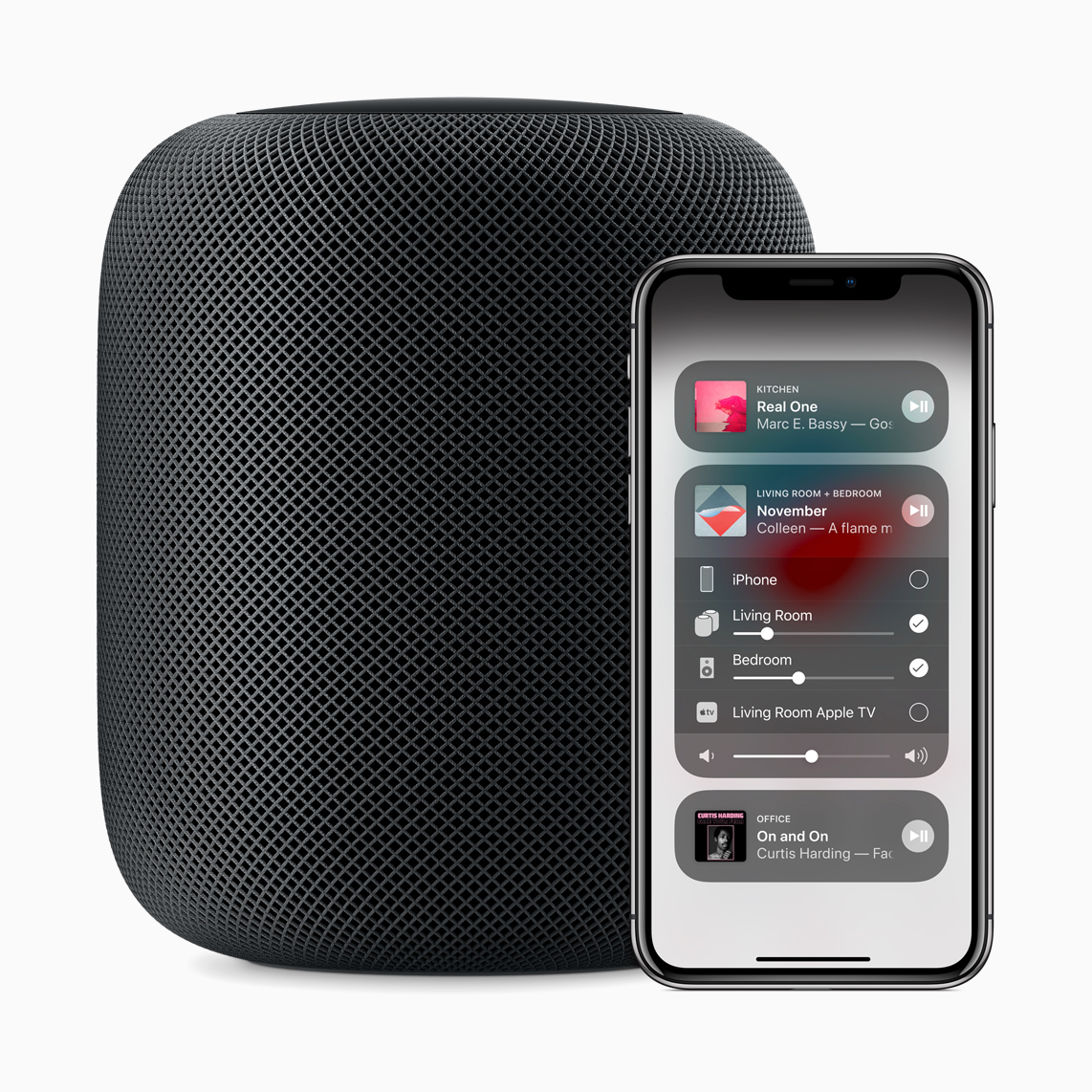
With AirPlay 2, you can play music in any room, move music from one room to another, or play the same song in multiple rooms using an iOS device through an app or Control Center, the Apple TV, the HomePod or by using Siri voice commands. You can access AirPlay 2 controls within any app and also in the Control Center on an iOS device running iOS 11.4 by swiping up. In the Control Center, you will see a list of all available AirPlay 2 devices in your home. You can send audio to a single device, to multiple devices, or switch audio between devices. 


Image via Apple

Image via Apple

Richer Sound Reproduction via HomePod Pairing

Equipped with a powerful A8 chip in each speaker, HomePod can play its own audio channel, left or right and separate out ambient and direct energy. This creates a fuller, almost  three dimensional soundstage for any room. Stereo pairing works via an Apple-designed wireless peer-to-peer direct link that enables communication between two or more HomePods and to play music in sync. The two speakers act as one when paired, and only one HomePod responds to Siri requests.

Setting up HomePod pairs is easy as you will receive a prompt with a popup interface to pair your HomePods if you have more than one. The same information is also available in the HomePod's settings in the Home app. In the Settings menu, menu, tap on Create stereo pair. Then select another HomePod,  choose your room, and assign left and right channels to each HomePod. Set up is almost instantaneous and you can benefit from a richer sound immediately. Paired HomePods offer a richer room-filling sound experience with a deeper bass and louder sound.

If the song you are playing supports stereo sound, you can distinctly hear different instruments being played on each HomePod. This experience is further enhanced if you connect to an Apple TV.


High Fidelity Audio Playback and Improved Podcast Acoustic Experience

Hayden's in London

Hayden's in London

We are thrilled to see these updates and increasing audio performance and connectivity as we get ready to launch our Hayden's podcast, Stardust this year. www.haydensm.com/podcast


Image via Apple

Image via Apple

AirPlay 2, Multi-Room Audio and Syncing with Other Speakers

What we are most excited about is AirPlay 2  functionality as this extends wireless use of your HomePod(s) to multiple rooms and enables connections to other speakers you may have such as Bower & Wilkins, Bang & Olufsen, Bluesound, Bose, Denon, Libratone, Marantz, Marshall, Naim, Pioneer and Sonos. You can listen to your existing music collection, stream new music and listen to podcasts anywhere in your home in sync with your speakers. 

The Control Center offers a quick view of what’s playing in every room and simple controls to adjust volume and more. When you select a single HomePod, you can play music in that room. Adding another HomePod, enables multi-room audio. When you have chosen two HomePods, each one receives its own volume slider for granular volume control. In addition, there is a master volume slider to adjust both speakers simultaneously.

You can also play music via YouTube or other streaming method. You will be prompted to choose the HomePod speaker for playback.

AirPlay 2 controls are available across iOS within any app and in Control Center for quick access to what’s playing in every room, on every speaker. Apple Music subscribers can also ask Siri to play different songs in different rooms or the same song everywhere, without ever leaving the room.

In addition, this synchronization addresses prior connection issues and lag while streaming audio and helps to ensure a better acoustic experience. You can ask Siri to play music in any room right from an iOS device or by asking Siri on HomePod.

Siri integrates well with Apple Music and with growing playlists and users, Siri's knowledge of music has increased.


Image via Apple

Image via Apple

Set Up and How to Update Your HomePod

Set up is easy as the new HomePod software is installed automatically on the HomePod after you update to iOS 11.4. to update your phone, go to the Settings app → General → Software Update.

After you update your iPhone to iOS 11.4, you can also navigate to the Home app, tap Edit and tap on HomePod > Details to go into its settings. Then tap Update Software.

If your HomePod is set up to automatically download and install new firmware, the latest version should already be installed on the device. After you have all your updates installed, Multi-room audio should just work right out of the box.

Start playing music on any iOS device and then select the HomePod. Any speakers you have that are compatible with AirPlay 2 will show up in a pop-up menu with a small checkbox next to them. You can choose multiple speakers to all play the same song from your iPhone or iPad. Apple Music integrates very well with multi-room audio via HomePods.

HomePod is available in the U.S., U.K. and Australia and will be available in Canada, France and Germany starting June 18.

We expect more coverage about the HomePod updates in WWDC this upcoming Monday June 4, 2018. You can see our prior coverage from last here on the HomePod, podcasts and more here. 

We'll be watching and covering WWDC on Monday! 


Privacy at Elf

Elf

eight_col_Privacy_(Flickr_user_Mike_McKenzie_Image_via_www.vpnsrus.com).jpg

At Elf, we take security and privacy seriously. We prioritize privacy. Protecting privacy been a top priority of our decision-making process throughout our company and in the work we do with our clients. We come from the point of view of the end user, the customer always. We do this because we care, not because we have to. It is just the right thing to do.

We also periodically update our Privacy Policy to stay current with new consumer protection laws such as General Data Protection Regulation (GDPR). We work with companies (Mailchimp, Inmotionhosting and others) who follow and maintain stringent certification standards for the Department of Commerce's US/EU and US/Swiss Safe Harbor Frameworks.

If you subscribe to our event newsletters or part of any mailing lists previously, you do not need to take any action to stay current. You can always unsubscribe at any time. Thank you for being part of our community. We have met terrific people through our events, workshops and Hayden's community. We would love to continue to connect with you and grow our community together. Thank you.

Choice Matters

Choice matters. It's also part of providing an excellent experience. Customers want the option to choose who they receive marketing and advertising from, when and how often. This choice truly pertains to any advertising or marketing you receive as a customer. 

In many ways, it is like shopping. Consumers are far more intelligent and perceptive than the advertising and marketing they have been forced to receive for many years. When you give them better options, they are eager to take them. No one wants their privacy or confidentiality stolen or to be spammed by advertisers.

Adopting GDPR may be difficult for companies that have not prioritized privacy before. However, when all is said and done, your customers and subscribers have chosen to opt in versus opt out. That's consumer freedom.

Having Integrity

We are cognizant of this and follow this at Elf and in our work with clients. Ultimately, we believe that companies that pay attention and respect the privacy of individual consumers, that do not sell your data and are transparent, will succeed over the long-term because they have chosen to act with integrity and to value their customers.